PHP Classes

File: README.md

Recommend this page to a friend!
  Packages of Christos Drogidis   VSC Dobu Helper   README.md   Download  
File: README.md
Role: Documentation
Content type: text/markdown
Description: Documentation
Class: VSC Dobu Helper
Create DoBu documentation blocks in Visual Studio
Author: By
Last change: 0.0.4
0.0.4
Date: 1 month ago
Size: 6,132 bytes
 

Contents

Class file image Download

DoBu Logo

Ascoos DoBu Helper

Official VS Code Snippet Extension for DoBu ? Documentation Builder for Ascoos OS

VS Code Version License: AGL GitHub Downloads (all assets, all releases) GitHub Release GitHub Release Date GitHub repo size

Ascoos DoBu Helper is the official snippet package for DoBu inside Visual Studio Code.

It allows you to quickly and correctly create DoBu documentation blocks in PHP, CSS, JavaScript, C++ and other languages.

What is DoBu?

DoBu (DOcumentation BUilder) is a Documentation DSL specifically designed for the Ascoos OS ecosystem.

It is a semantic documentation layer that lives inside simple docblocks and supports multilingual metadata, mathematical formulas, behavioral descriptions, export to multiple formats, and much more.

Read the official DoBu README for more details.

Key Features

  • Over 40 ready-made snippets for DoBu syntax
  • Support for PHP ? CSS ? JavaScript ? C++ ? Plaintext
  • Full File Skeleton with Ascoos OS branding
  • Ready templates for classes, methods, properties, constants, parameters, formulas, etc.
  • Multilingual blocks (`en` / `el`)
  • Automatic filling of dates, filenames, namespaces, etc.

Installation

The extension is currently distributed only as a VSIX file.

Download & Install

  1. Go to the Releases page
  2. Download the latest `ascoos-dobu-helper-x.x.x.vsix` (or newer)
  3. Open Visual Studio Code
  4. Go to the Extensions view (`Ctrl+Shift+X`)
  5. Click on the ... in the top right ? Install from VSIX...
  6. Select the downloaded `.vsix` file

> Tip: After the first release, you can also install it directly from the VS Code Marketplace (coming soon).

How to Use

Simply type one of the following prefixes and press Tab:

Basic & Useful Snippets

| Prefix | Description | |-------------------------------------|--------------------------------------------------------| | @dobu-file-skeleton | Full DoBu File Skeleton | | php-dobu-file-skeleton | Full PHP file with DoBu header (recommended) | | @dobu-class-skeleton | Class skeleton with methods | | @dobu-class-method | Single method inside a class | | @dobu-docblock-skeleton | Basic DoBu dockblock | | @dobu-skeleton-ascoos | Ascoos OS block | | @dobu-skeleton-project | Project block | | @dobu-skeleton-license | License selection | | @dobu-skeleton-author | Author information |

Multilingual & Descriptive Snippets

  • `@dobu-intro` ? Introduction
  • `@dobu-summary` ? Summary
  • `@dobu-desc` ? Detailed description
  • `@dobu-category` / `@dobu-subcategory`
  • `@dobu-params-method-skeleton` ? Method parameters
  • `@dobu-return-method` ? Return value
  • `@dobu-throws` ? Exceptions
  • `@dobu-formula` ? Mathematical formula (LaTeX / MathML)

Tip: Type @dobu to see all available snippets at once.

Examples

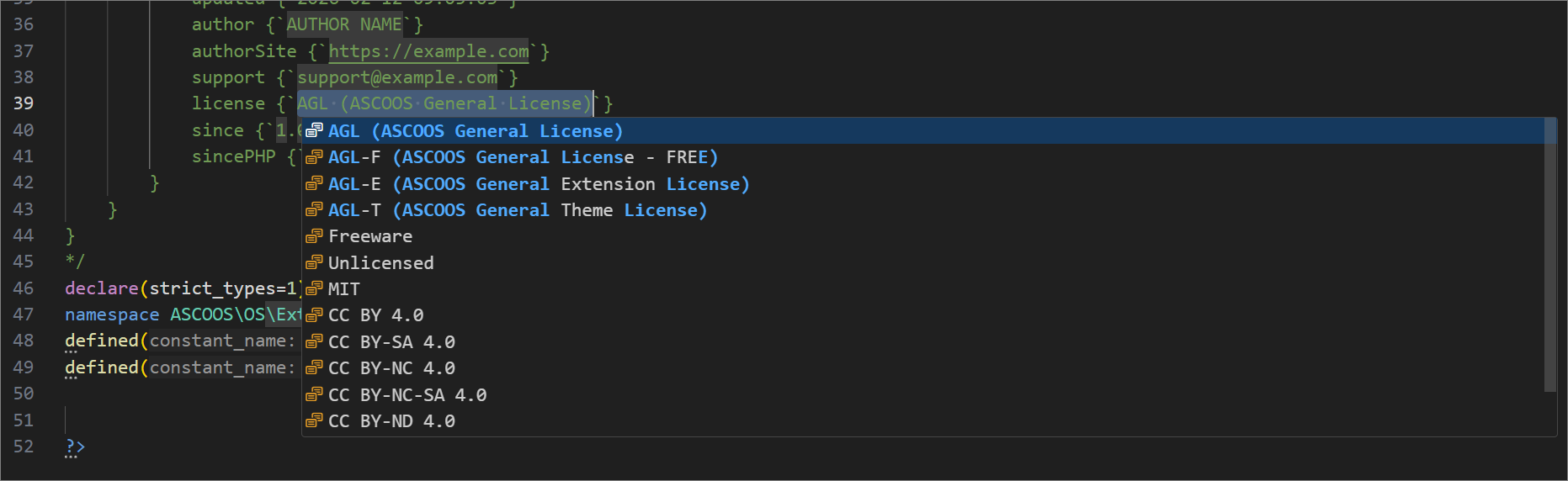
Example: License Selection

When using snippets that contain a license field, a ready dropdown appears with all available Ascoos OS licenses:

License Selection

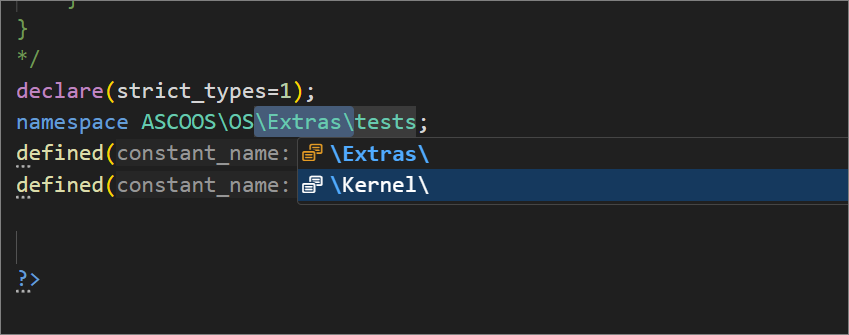
Example: Full PHP File Skeleton

By typing php-dobu-file-skeleton and pressing Tab, a complete file skeleton is automatically inserted:

Namespace class type selection

<?php
/*
dobu {
    file:id(`FILE-ID`),name(`${TM_FILENAME_BASE}`) {
        ascoos { ... },
        project { ... }
    }
}
*/
declare(strict_types=1);
namespace ASCOOS\OS\...;
defined("ALEXSOFT_RUN_CMS") or die("Prohibition of Access.");
...
?>

Namespace class type selection

Example: Adding a Method to a Class

method:id(`myMethod`),name(`myMethod`),syntax(`myMethod(string $param)`),return(`bool`),langs {
    en {`Description in English`},
    el {`????????? ??? ????????`}
},

Links

Author

Christos Drogidis Ascoos OS Team

License

This extension is distributed under the AGL (Ascoos General License).

See details here: http://docs.ascoos.com/lics/ascoos/AGL.html